
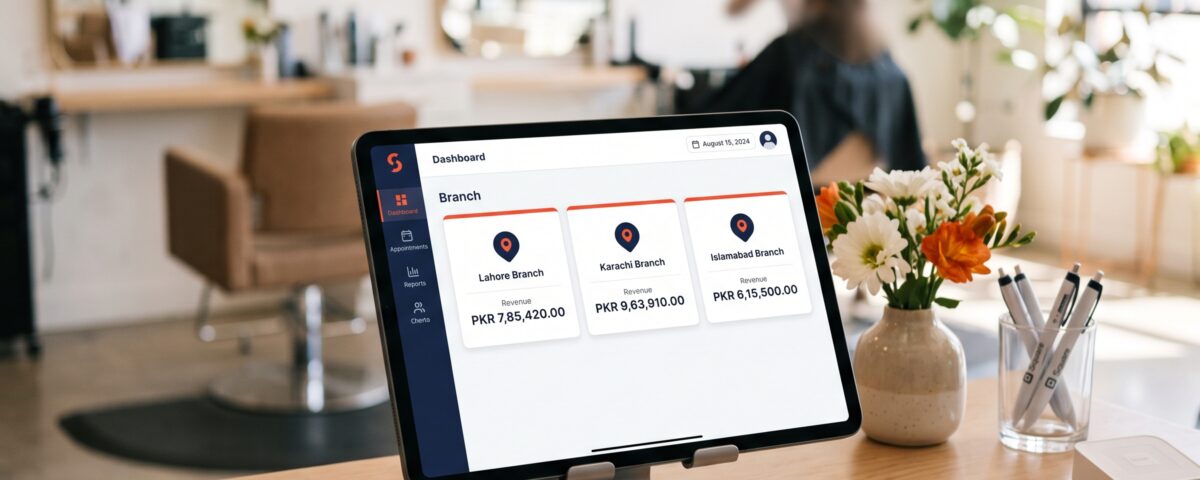
Running one salon is demanding enough. Running three, five, or ten branches across different neighborhoods multiplies every challenge, from staff scheduling to stock counts to knowing which outlet is actually making money. This is where multi-branch salon POS integration changes the picture entirely. Instead of checking separate registers, separate spreadsheets, and separate WhatsApp groups for updates, a connected salon management software setup pulls every branch into one dashboard so owners can see sales, inventory, and staff performance the moment it happens, not days later.
Table of Contents
Why Salon Chains Outgrow Standalone Systems
A single-location POS works fine when there is one till, one stockroom, and one manager who knows everything happening on the floor. The moment a second branch opens, that model breaks down. Each outlet starts keeping its own records, and owners end up piecing together a business-wide picture from mismatched reports days after the numbers actually mattered.
Common pain points that push salon owners toward a connected setup include:
- Inventory counts that never match between branches, especially for shared retail products
- Commission and payroll calculations done manually per outlet, increasing errors
- No single view of which branch is over- or under-performing
- Client history stuck at the branch where the client first visited
- Delayed month-end reporting because data has to be manually combined
None of these are minor annoyances once a chain crosses two or three locations. They compound, and they usually surface at the worst possible time, like during a stock audit or a tax filing deadline.
What Centralized Reporting Actually Looks Like
Centralized reporting is the core benefit of a multi-location POS integration setup. Rather than exporting numbers from each branch and merging them by hand, an integrated system automatically consolidates every transaction into one reporting layer.
With this in place, a salon owner can typically view:
- Daily and monthly revenue broken down by branch, service, and staff member
- Stock levels across all locations, so transfers happen before a product runs out
- Staff attendance and commission data pulled from every till automatically
- Client visit history regardless of which branch they walk into
- Peak hours and service demand patterns compared across outlets
This kind of visibility turns scattered numbers into decisions that can actually be acted on the same day, rather than a review that happens weeks later when the opportunity to fix something has already passed.
Core Features Behind Multi-Location Salon POS Integration
Not every POS marketed as “multi-branch” actually delivers real centralization. The features below are what separate a genuinely connected system from one that just runs the same software at different addresses.
Unified client database: Clients booking a haircut at one branch and a facial at another should never feel like they are starting over. A shared client profile keeps preferences, purchase history, and loyalty points synced across every location.
Cross-branch inventory visibility: Retail products, tools, and consumables move between outlets constantly. A connected system tracks stock in real time, flags shortages, and supports transfers between branches without manual reconciliation.
Role-based access control: Branch managers need visibility into their own outlet, while owners need the full picture. Multi-location POS integration allows permission levels so sensitive data, like overall profit margins, stays restricted to the right people.
Automated consolidated reporting: This is the reporting engine itself, pulling data from every branch into scheduled or on-demand sales and performance reports without anyone touching a spreadsheet.
Cloud-based access: Since data lives on a central server rather than a single in-store machine, owners can check performance from anywhere, and a hardware issue at one branch does not affect the others.
How This Impacts Day-to-Day Salon Operations
Beyond the reporting dashboard, salon chain POS integration changes how staff and managers work day to day. Bookings can be checked across branches, so a fully booked outlet can redirect a client to a nearby location instead of losing the appointment entirely. Inventory transfers become proactive rather than reactive, since low stock at one branch is visible before it becomes an actual shortage.
Payroll and commission tracking also becomes far less error-prone, since every service and sale is logged automatically at the point of transaction rather than reconstructed later from paper records. Front desk staff spend less time on administrative back-and-forth with head office, and managers spend less time chasing numbers that should already be sitting in a report.
For salon owners specifically weighing whether to stay with separate branch systems or move to a connected one, comparing a single salon vs salon chain POS setup side by side usually makes the operational gap clear fairly quickly.
Migrating From Separate Branch Systems
Moving from disconnected, branch-by-branch software to one integrated platform is usually less disruptive than owners expect, provided it is planned in stages rather than switched over all at once.
- Start with one branch as a pilot before rolling the system out chain-wide
- Migrate historical client and inventory data before going live, not after
- Train front desk staff on the new workflow a few days ahead of launch
- Run the old and new system in parallel for a short overlap period to catch discrepancies
- Set a fixed cutover date so branches are not split between two systems for long
A phased rollout like this keeps daily operations running while the transition happens in the background, rather than forcing every branch to adapt overnight.
Choosing the Right System for Growth
A salon planning to expand beyond one location should evaluate POS software the same way it would evaluate a hiring decision, based on where the business is headed, not just where it stands today. A few practical questions help narrow the choice:
- Does the system support unlimited branches, or is there a hard cap?
- Can reports be filtered by branch, staff, or service category individually?
- Is client data shared across locations by default or does it require manual syncing?
- Does the platform stay compliant with local tax and invoicing requirements as branches are added?
Salons operating under FBR-regulated invoicing rules, for instance, need a system that keeps that compliance consistent across every branch rather than configuring it separately each time a new outlet opens. This is exactly the gap that dedicated salon management software is built to close, giving multi-branch operators one system instead of several disconnected ones.
Conclusion
Multi-branch salon POS integration is less about adding new software and more about removing the disconnect between how a salon actually operates and how its data is tracked. Once every branch feeds into one reporting system, owners spend less time reconciling numbers and more time acting on them, whether that means restocking a product, adjusting staffing, or deciding where the next branch should open. Platforms like myPOS approach this by centralizing branch data into a single reporting layer while keeping day-to-day billing and client management straightforward for staff at each outlet.
Frequently Asked Questions
1. What is multi-branch salon POS integration?
It is a system that connects all salon outlets into one platform for shared data and centralized reporting.
2. Can a multi-location salon POS track inventory across branches?
Yes, most connected systems show real-time stock levels and support transfers between outlets.
3. Does centralized reporting work for salons with only two branches?
Yes, the same reporting benefits apply whether a salon has two branches or twenty.
4. Is client history shared between salon branches automatically?
In an integrated system, client profiles and visit history sync across all connected locations.
5. How does multi-branch POS integration help with staff commission tracking?
It logs every service and sale automatically per branch, reducing manual commission calculation errors.